

If your business has been hit by ransomware, the actions you take in the next few hours will determine how catastrophic the event will be for your operations.
Below is a step-by-step action plan to immediately contain the threat and perform a successful ransomware recovery.
Talk to a Ransomware Recovery Specialist
If your business is struggling to recover from a recent ransomware attack, our data protection specialists can help you assess your recovery options, protect critical data and build a stronger long-term resilience strategy.
Schedule a Consultation →Phase 1: Containment (Immediately After Infection)
The critical first step to a ransomware recovery is containing the infection. When a ransomware attack is active, the malware is aggressively crawling through your network, seeking out mapped drives, connected storage and even your backup repositories. Your immediate priority is containment: stopping the infection before it spreads any further.
1. Disconnect Infected Devices
The instinct for many IT professionals and end-users is to pull the power plug or hold down the power button on infected machines. Do not do this – at least, not yet.
Powering down a machine forcefully can corrupt files that are actively being encrypted, effectively destroying data that might have otherwise been salvageable. Furthermore, powering down deletes the volatile memory (RAM), which often contains critical evidence, encryption keys or malware footprints that cybersecurity experts need to reverse-engineer the attack.
What to do instead:
- Physically disconnect any Ethernet cables from infected devices.
- Disable Wi-Fi adapters.
- Unplug external hard drives and USBs immediately.
- Sever the connection to your primary network switches if the infection is widespread.
2. Power Down Non-Infected Devices
If you have servers, employee workstations or laptops that do not currently show signs of infection, your goal is to protect them before the malware spreads.
- Disconnect them from the network immediately. Unplug Ethernet cables and turn off Wi-Fi.
- Shut down. Unlike infected machines (which generally should remain powered on for forensics), clean machines should be shut down normally. This creates a physical “air gap.” A powered-off machine cannot be infected over the network. Keep them off until your IT recovery team has declared the environment completely sanitized.
3. Isolate Your Backups Immediately
Recent ransomware attacks in financial services and other industries show that variants are increasingly designed to hunt down and encrypt backup files first, removing your safety net before you even know you are under attack.
- If your backup appliances (like NAS drives or local BCDR devices) are connected to the network, disconnect them immediately.
- If you have cloud backups, log into your portal from a clean, uninfected device (like a personal smartphone operating on cellular data) and temporarily lock down access credentials.
4. Identify the Scope of the Infection
Once the environment is physically segmented, you need to determine the blast radius.
- Which servers are encrypted?
- Has the ransomware reached your Active Directory?
- Are your cloud environments (like Microsoft 365 or Google Workspace) compromised?
Document everything. Take photos of the ransom notifications with your smartphone. Do not close the ransom note file, as it often contains specific identifiers that ransomware recovery experts need to identify the exact ransomware variant (e.g., LockBit, BlackCat, Phobos, etc.) – see Phase 3, Step 1 below for why this is important.
5. Contact Your Cyber Insurance Provider
If your organization carries cyber liability insurance, notify your carrier immediately before making major recovery decisions.
Many policies require prompt notification and may specify approved incident response vendors or forensic investigators. Acting independently—such as wiping systems or paying a ransom—could complicate or even jeopardize coverage.
Be prepared to provide:
- When the attack was discovered
- Which systems appear affected
- Any ransom demands received
- Actions already taken to contain the incident
Even if you’re unsure whether the event is covered, early notification is generally recommended.
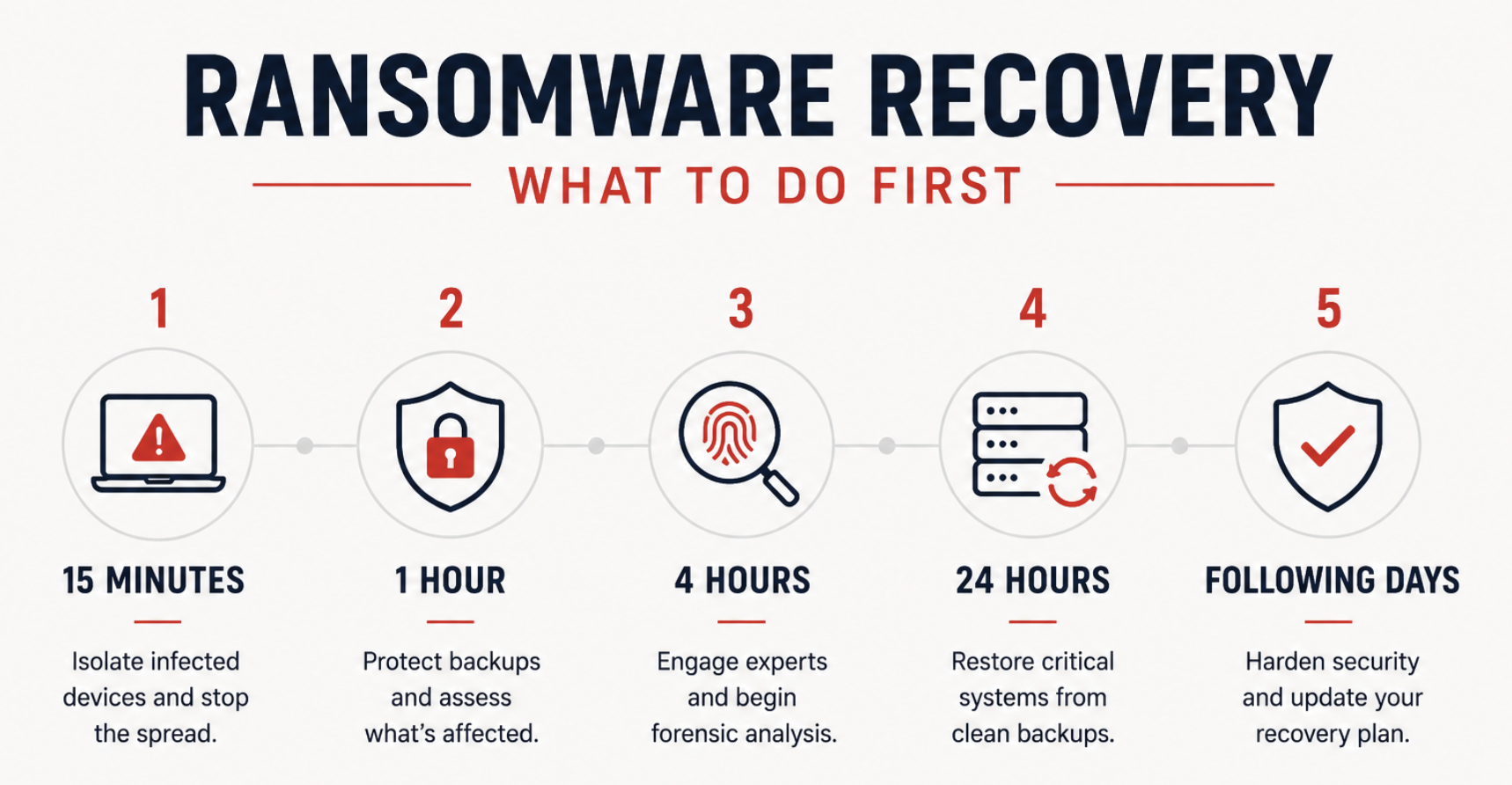
Ransomware Recovery Example Timelines & Steps
| Time | Priority |
| First 15 minutes | Disconnect infected devices and isolate the network |
| First hour | Protect backups, identify affected systems, notify leadership |
| First 4 hours | Engage recovery specialists, begin forensic analysis |
| First 24 hours | Restore critical business systems, verify clean backups |
| Following days | Harden security, monitor for reinfection, update recovery plan |
Phase 2: Ransom Payment Considerations
Business leaders often face a grim question: Should we just pay the ransom to get our data back faster? As business continuity experts, Invenio IT generally advises against paying the ransom unless every other recovery option has been exhausted and/or business survival is completely dependent on it. Here is why and what to consider:
1. Payment Does Not Guarantee Data Return
There is no legal contract binding attackers to hand over the decryption key. Disaster recovery statistics consistently show that a significant percentage of businesses that pay the ransom either:
- Never receive a working key
- Receive a faulty key that corrupts the data upon decryption
- Only get a portion of their data back
2. The Threat of Double Extortion
Modern ransomware gangs no longer just encrypt your data; they exfiltrate (steal) it first. This is known as double extortion. Even if you pay the ransom to get your files decrypted, the attackers may still threaten to leak sensitive client data, employee records or intellectual property on the dark web unless a second extortion fee is paid.
3. Legal and Compliance Risks
Depending on your industry and location, paying a ransom may actually be illegal or out of compliance with strict regulations like HIPAA. The U.S. Department of the Treasury’s Office of Foreign Assets Control (OFAC) has issued strict advisories that paying ransoms to sanctioned entities can result in severe civil penalties for the victimized business.
4. You Become a Repeat Target
Paying a ransom marks your organization as a “willing payer.” It is incredibly common for businesses that pay a ransom to be attacked again—sometimes by the exact same group using a different backdoor, or by a different gang that purchased your network vulnerabilities on the dark web.
Phase 3: Our Ransomware Recovery Protocol
When you engage an IT provider for emergency ransomware remediation or server recovery, the process will depend largely on your infrastructure and the scope of the infection. At Invenio IT, we follow a strict, battle-tested methodology to get businesses back online safely. But the exact steps will vary by the situation – every ransomware recovery is different.
1) Rapidly Triage and Perform Forensics
- a) Assess the damage and immediately attempt to identify the specific ransomware variant.
- Identifying the exact strain is critical—not only does it tell our incident response team how the malware behaves and spreads, but it also determines if a decryption key already exists.
- Cybersecurity coalitions frequently release decryptors for older or cracked ransomware variants, meaning it may be possible to unlock your data without relying on backups or paying a ransom.
- b) Locate the point of entry (e.g., a compromised RDP port, a phishing email, unpatched software) and close the vulnerability so the attackers are permanently locked out of your network.
2) Verify Backup Integrity
If you have backups, mount them in an isolated, secure sandbox environment. Scan them meticulously to ensure that the data is clean, uncorrupted and entirely free of dormant malware payloads.
3) Stage Recovery in a Clean Environment
Rebuild your infrastructure. Depending on the situation, this could mean bare-metal restores to your physical servers, spinning up virtual machines in the cloud or utilizing robust BCDR appliances (i.e. Datto SIRIS) to virtualize your servers. Ensure the environment is clean before your data is reintroduced.
4) Restore Data Strategically
Dumping terabytes of data back onto a network at once can cause massive bottlenecks. Identify your mission-critical applications to restore your most vital data first—getting your essential operations back online—while the rest of your archive data restores in the background.
5) Harden and Future-Proof Your Systems
Once you are back online, update your disaster recovery plan to implement strict security policies, including Multi-Factor Authentication (MFA), endpoint detection and response (EDR) and immutable backups to ensure that even if an attacker breaches your perimeter again, your backups can never be compromised.
Can Your Backups Survive Ransomware?
If your current backup failed during an attack, it’s time to rethink your data protection strategy. Datto BCDR solutions combine rapid ransomware recovery, automated backup verification and immutable cloud protection to help keep your recovery options intact.
View Datto Backup Solutions →Common Mistakes in Ransomware Recovery
When faced with server crashes or ransomware, moving too quickly—or taking the wrong steps—can actually make the situation worse. If you are attempting to handle the crisis in-house, it is critically important to avoid these common mistakes:
- Wiping the Environment Too Early: If you immediately reformat your servers and begin restoring data without finding the initial point of entry (the root cause), you are simply restoring your pristine data into a compromised environment. The hackers may just encrypt it again.
- Restoring Corrupted Backups: Ransomware often dwells in a network for weeks or months before detonating. If you blindly restore your most recent backup, you may be restoring the dormant malware right back onto your servers.
- Compliance Negligence: Attempting a rapid fix often destroys forensic evidence required by your cyber liability insurance provider, potentially voiding your coverage or pushing you out of compliance with industry-specific regulations.
How to Prepare for the Next Attack
The best ransomware recovery strategy begins before an attack occurs – with robust prevention, planning and the right technology.
Organizations should regularly:
- Test backup restoration procedures
- Maintain offline or immutable backups
- Segment critical systems
- Enable multifactor authentication
- Patch known vulnerabilities
- Conduct employee phishing awareness training
- Develop a documented disaster recovery plan
- Review recovery time objectives (RTOs) and recovery point objectives (RPOs)
Preparation can dramatically reduce recovery time and business disruption.
Frequently Asked Questions in a Ransomware Crisis
1. How long does ransomware recovery take?
The timeline varies wildly depending on the scope of the attack, the speed of your local network, and the size of your data. If you have a true business continuity solution in place, critical servers can often be virtualized and restored in minutes or hours.
2. What is a good ransomware recovery plan?
A strong recovery plan requires four fundamental steps: 1) Isolate: Immediately disconnect networks to contain the spread; 2) Analyze: Perform forensics to close security gaps; 3) Verify: Ensure backups are completely free of malware; 4) Restore: Recover data safely, minimizing downtime without paying the ransom unless as an absolute last resort.
3. Should you pay the ransom in a ransomware attack?
The FBI and most IT providers advise against paying the ransom unless all other viable options for data recovery have been exhausted. Paying the ransom does not guarantee you will get your data back, and it may increase your risk for more attacks.
4. How to investigate a ransomware attack?
Investigating ransomware requires identifying the malware variant via ransom notes and encrypted file extensions. Analyze your endpoint, firewall, and Active Directory logs to locate the initial entry point and review network traffic to determine if sensitive data was exfiltrated prior to encryption.
5. Can ransomware infect cloud backups?
Yes. If your cloud backup is directly mapped to your local network, the ransomware will encrypt the cloud files just like local files. This is why true BCDR requires immutable backups—backups that cannot be altered, encrypted or deleted by anyone, even an administrator, for a set period of time.
Conclusion
A ransomware attack is one of the most paralyzing events a business can face, but reacting blindly will only compound your data loss. By immediately containing the threat, preserving critical forensic evidence, and executing a mathematically clean restoration process, you can stop the bleeding and perform a successful ransomware recovery that brings your business back from the brink.
Don’t Face a Crisis Alone
Get the guidance you need for a successful ransomware recovery, supported by today’s best backup technology for small to mid-sized businesses. Schedule a meeting with our business continuity experts, call us at (646) 395-1170 or email success@invenioIT.com


